- 16 Posts
- 17 Comments

 7·4 个月前
-
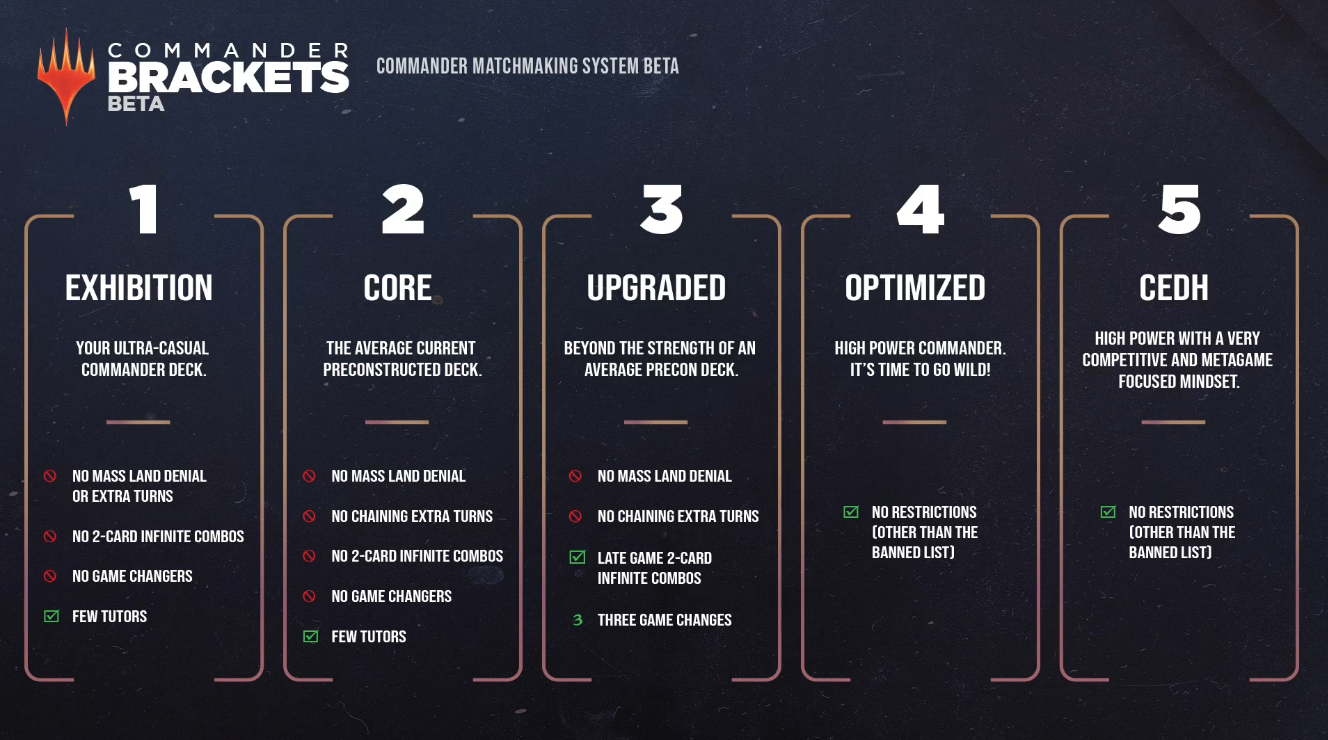
Commander with low power brackets, no tutors, no infinite combos, and mostly budget decks.
-
Cube Draft.
-
Playing precons against the computer using Forge. I copy the names of the precons from a block, then play them against each other using a bit of randomization:
import itertools, random decks = ["Deck A", "Deck B", "Deck C", ...] matchups = list(itertools.combinations(decks, 2)) random.shuffle(matchups) for i, (deck1, deck2) in enumerate(matchups, 1): print(f"Match {i}: {deck1} vs {deck2}")- Aside from the usual Theme Decks, some of the most interesting precons are Duel Decks, Pro Tour Collector Sets, Salvat 2005 and 2011, and Commander decks. You can find a full list of precon decks here.
- Penny Dreadful on MTGO when I want constructed but cheap play.
- I’ve played a bunch of Draft and Standard on MTG Arena but I didn’t really enjoy it that much. It felt like a chore doing the dailies and just caring about getting the four wins per day.
-
I really used to like classic cards like Serra Angel and Shivan Dragon and I don’t know exactly when they became so bad, but I couldn’t even consider playing them now in most formats.
I believe Throne of Eldraine in 2019 was the set where power creep started accelerating most.
MTG Deck Legality Web Checker
A simple web tool for validating Magic: The Gathering decklists in a custom format.
Inspiration
This project was inspired by several sources:
- Badaro’s Validator GitHub, a simple web tool for checking card lists in “nostalgia” Magic the Gathering formats: https://badaro.github.io/validator
- Penny Dreadful, an unofficial, budget-friendly MTG Constructed format where only cards costing 0.02 tix or less are legal. Decks are 60 cards with a 15-card sideboard, promoting creative play with inexpensive cards.
- Heirloom Constructed, a fan-created format combining Legacy-style interactions with price caps. Cards are legal based on current prices, with different caps for mythics, rares, uncommons, and commons. The format rotates weekly after new Standard set releases, providing a dynamic but affordable competitive environment.
Features
- Automatic setup: Downloads Oracle bulk-data from Scryfall and builds legality files on first run.
- Custom format validation: Checks decks for banned or out-of-format cards.
- Browser interface: Paste a decklist, click Validate, and view results instantly.
Installation
It is recommended to use a virtual environment to keep dependencies isolated.
1. Clone the Repository
git clone https://git.disroot.org/hirrolot19/mtg-legality-checker.git
cd mtg-legality-checker
2. Create and Activate a Virtual Environment
python -m venv venv
source venv/bin/activate
3. Install Dependencies
pip install -r requirements.txt
Running the App
From the project root (with the virtual environment activated):
python app.pyThen open your browser and navigate to:
http://127.0.0.1:5000/First Run Behavior
On first launch, the app will:
- Download Scryfall’s Oracle card data.
- Filter legal cards for the custom format based on a Scryfall query. Default query is f:standard usd<=1 tix<=0.1
- Convert the filtered data into a validation JSON file.
This process may take a few minutes.
Once complete, cached files are stored persistently for future sessions.
Using the Web Checker
- Paste your decklist into the text box.
- Click Validate.
- The app displays any cards that are banned or not legal in the format.
Decklist Rules
- One card per line.
- Quantities accepted (
4 Lightning Bolt,2x Opt). - Comments start with
#. - “Deck” or “Sideboard” headers ignored.
Advanced Usage
For detailed information about the supporting scripts and command-line tools, see
tools/README.md.


I’ve managed to write another script that seems to work:
import json
import re

def load_legal_cards(json_file):
    """
    Load legal cards from a JSON file with structure:
    { "sets": [], "cards": [], "banned": [] }
    """
    with open(json_file, 'r', encoding='utf-8') as f:
        data = json.load(f)
    legal_cards = [card.lower() for card in data.get('cards', [])]
    banned_cards = [card.lower() for card in data.get('banned', [])] if 'banned' in data else []
    return legal_cards, banned_cards

def clean_line(line):
    """
    Remove quantities, set info, markers, and whitespace
    Skip lines that are section headers like 'Deck', 'Sideboard'
    """
    line = re.sub(r'^\d+\s*x?\s*', '', line)  # "2 " or "2x "
    line = re.sub(r'\(.*?\)', '', line)        # "(SET)"
    line = re.sub(r'\*\w+\*', '', line)        # "*F*"
    line = line.strip()
    if re.match(r'^(deck|sideboard)\s*:?\s*$', line, re.IGNORECASE):
        return None
    return line if line else None

def validate_deck(deck_file, legal_cards, banned_cards):
    """
    Returns a list of illegal cards
    """
    illegal_cards = []
    with open(deck_file, 'r', encoding='utf-8') as f:
        lines = f.readlines()

    for line in lines:
        card_name = clean_line(line)
        if not card_name or card_name.startswith("#"):
            continue  # skip empty or comment lines

        card_lower = card_name.lower()
        if card_lower in banned_cards or card_lower not in legal_cards:
            illegal_cards.append(card_name)

    return illegal_cards

def main():
    legal_cards_file = 'legal_cards.json'   # JSON with "cards" and optional "banned"
    decklist_file = 'decklist.txt'          # Your decklist input

    legal_cards, banned_cards = load_legal_cards(legal_cards_file)
    illegal_cards = validate_deck(decklist_file, legal_cards, banned_cards)

    if illegal_cards:
        print("Illegal cards:")
        for card in illegal_cards:
            print(card)

if __name__ == "__main__":
    main()
I exported the Standard Penny collection from Moxfield to JSON using a Python script:
import csv
import json

input_csv = 'moxfield_haves_2025-10-21-1123Z.csv'
output_json = 'standard_penny.json'

sets = set()
cards = []

with open(input_csv, newline='', encoding='utf-8') as csvfile:
    reader = csv.DictReader(csvfile)
    for row in reader:
        name = row.get('Name')
        edition = row.get('Edition')
        if name:
            cards.append(name)
        if edition:
            sets.add(edition.upper())

sets = sorted(list(sets))

output_data = {
    "sets": sets,
    "cards": cards
}

with open(output_json, 'w', encoding='utf-8') as jsonfile:
    json.dump(output_data, jsonfile, indent=2)

print(f"JSON saved to {output_json}")
I saved the JSON file as
validator/formats/standardpenny.jsonand added it to the validator’s config:{ "name": "Standard Penny", "key": "standardpenny", "datafile":"formats/standardpenny.json" },Then I tried to validate this deck exported as Plain Text from Moxfield and got the error.
When I try to validate a deck, I only see the message “Loading data, please wait…” and nothing happens. So I’m not sure if it’s a problem with my JSON export, the file path, or the validator itself.
No, it’s just for reference.
Seems simple enough, so I’m going to try and make one myself. Here’s the idea I have so far:
- User selects a default format or uploads a JSON list of legal cards.
- User pastes decklist text or uploads deck JSON.
- Script compares deck entries with legal list.
- Output = list of illegal cards.
I’m not aware of a single tool, but you could ensure the deck is standard legal in any normal deck building tool, then additionally check it against the Penny Dreadful deck checker - if it passes both, it should be legal in your format (assuming I understand what you’re doing correctly.)
Edit: Nevermind, I see you’re limiting it to $1, not $0.01, despite borrowing the name. Penny Dreadful checker won’t work.
Yeah Penny Dreadful uses tix<=0.02 and this uses both tix<=0.1 and usd<=1
✅ This will create a fully Moxfield-compatible CSV with all cards from a Scryfall search.
import requests
import csv
import time

QUERY = "f:standard f:penny usd<=1"
BASE_URL = "https://api.scryfall.com/cards/search"
PARAMS = {
    "q": QUERY,
    "unique": "cards",
    "format": "json"
}

OUTPUT_FILE = "moxfield_import.csv"

FIELDNAMES = [
    "Count",
    "Tradelist Count",
    "Name",
    "Edition",
    "Condition",
    "Language",
    "Foil",
    "Tags",
    "Last Modified",
    "Collector Number",
    "Alter",
    "Proxy",
    "Purchase Price"
]

def fetch_all_cards():
    url = BASE_URL
    params = PARAMS.copy()
    while True:
        resp = requests.get(url, params=params)
        resp.raise_for_status()
        data = resp.json()
        for card in data.get("data", []):
            yield card
        if not data.get("has_more"):
            break
        url = data["next_page"]
        params = None
        time.sleep(0.2)

def write_cards_to_csv(filename):
    with open(filename, "w", newline="", encoding="utf-8") as f:
        writer = csv.DictWriter(f, fieldnames=FIELDNAMES)
        writer.writeheader()
        for card in fetch_all_cards():
            row = {
                "Count": 1,
                "Tradelist Count": "",
                "Name": card.get("name"),
                "Edition": card.get("set"),
                "Condition": "",
                "Language": card.get("lang"),
                "Foil": "Yes" if card.get("foil") else "No",
                "Tags": "",
                "Last Modified": "",
                "Collector Number": card.get("collector_number"),
                "Alter": "",
                "Proxy": "",
                "Purchase Price": ""
            }
            writer.writerow(row)

if __name__ == "__main__":
    write_cards_to_csv(OUTPUT_FILE)
    print(f"Saved all cards to {OUTPUT_FILE}")
My first try was using this script:
Query Scryfall + dump card names out for easy import into Moxfield❯ python scryfall_search.py -q "f:standard f:penny usd<=1" --output-as-file "$HOME/desktop/out.csv" Running Scryfall search on f:standard f:penny usd<=1 legal:commander Found 1,197 total matches!But when I tried importing the output csv in Moxfield, I got a bunch of
No card name found on line xerrors.
The list needs to be static. How can you create decks for a format that is constantly changing? What I need is a way to share a consistent list of legal cards so that everyone can search within the same list, rather than each person having a different version.
Are you answering to the right post?
I was thinking just a few days ago how I wish I was playing Magic: The Gathering when some sets were released to play Limited with those sets. Seems like I’ve found just what I wanted.
A Flashback Draft is a limited-time event on Magic Online where players can draft and play with sets from the past. The sets available for Flashback Drafts change regularly, and Wizards of the Coast does not publish a schedule for them. However, players can stay up to date on upcoming Flashback Drafts by checking the Magic Online website or following Magic Online’s social media accounts. Flashback Drafts are a popular way for players to experience sets that they may have missed or to revisit sets that they enjoyed in the past. The entry fee for Flashback Drafts varies depending on the set and the type of draft league, but players can typically use event tickets or play points to enter.
Flashback Format
-
Inspired by the MTGO Flashback Drafts, but for constructed play
-
Minimum deck size: 60 cards
-
No more than 4 copies of any card, except basic lands
-
Cards can be of any rarity
-
The legal card pool changes every month, based on a randomly selected block from Magic’s history
-
You can only use cards from the chosen block, and only from the sets that were released at that point in time
-
For example, if the block is Innistrad, you can use cards from Innistrad, Dark Ascension, and Avacyn Restored, but not from Shadows over Innistrad or Eldritch Moon
-
Additionally, you can only use cards that cost less than $1 according to Scryfall’s market price
-
This format lets you revisit old sets and experience different eras of Magic with a budget-friendly twist
-
It challenges you to adapt to changing metagames and discover new synergies with limited card choices
-

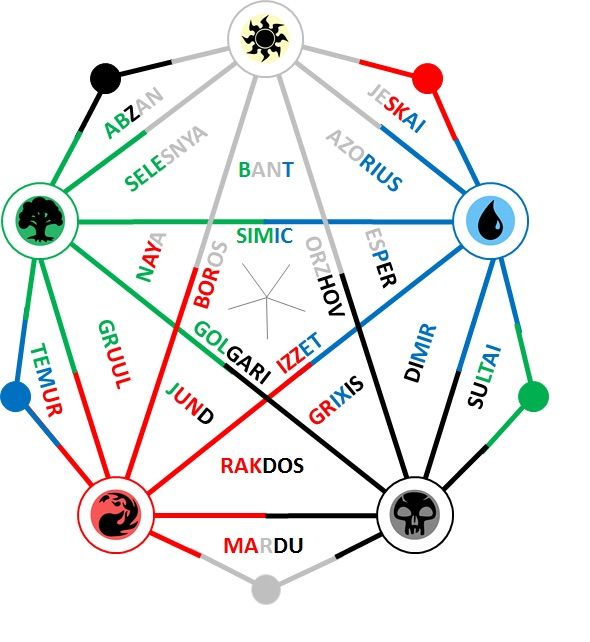

Ideas to shake up the meta:
- Rotate the legal card list monthly instead of after each regular set release.
- Each rotation, ban the top 1% most played cards for a number of rotations. Or a random number of rotations for each card so they don’t all become legal again simultaneously.
- Set a limit on the max number of copies allowed of each card. The limit could be randomized each rotation.
- Limit the number of rares/mythics allowed per deck.
- Require a minimum number of cards from the latest sets.
- Have occasional flashback weekends using previous cardpool rotations.
- Sometimes change to a different base cardpool like a block format or a format other than vintage.
This tool isn’t really needed given that there are multiple websites, where you can upload your collection and your deck, and they will tell you exactly which cards in the deck are missing from your collection.
For example:
So while a custom format legality checker is neat, if your goal is simply “which cards do I lack in this deck given my collection”, one of those sites will do just fine.