
- cross-posted to:
- techsupport@lemmy.world
objectstorage.eu-amsterdam-1.oraclecloud.com
- cross-posted to:
- techsupport@lemmy.world
You must log in or register to comment.
Tab Completion if you’re unsure how to escape characters in this case. Start the name of the folder, then hit TAB a couple times
⬆️⬆️⬆️This⬆️⬆️⬆️
No, it should be:
↹↹↹This↹↹↹
Or even:
Th↹
(Assuming you have a file/folder called “This” and no others starting with “Th”)
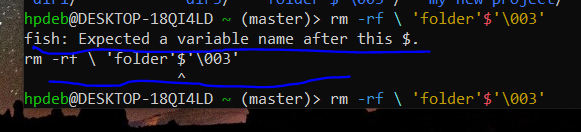
Fish is the command line shell your using (similar to bash). Usaslly the $ symbol perceeds a variable name, hence the error. Do you have a folder with a $ in the name?
‘folder’$‘\003’
That’s the name of the folder.
What does
lsshow?you can escape special charcters with
\something like\'folder\'\$\'\\003\'might workbe careful with
rm -rfas you might delete your entire disk if done badly. use some other command to test if it targets the correct directory likels \'folder\'\$\'\\003\'Yep as others have noted put a \ in front of each special character. The \ tells the system to treat the following character as a alphanumeric character in the string and not as a operator or a command. Since ', $ and \ are all special characters you will need a \ just before each when typing this name. Also as mentioned do this with a benign command like ls first to make sure your only acting on that specific directory or you might have a bad day.
Edit: How the heck did you get some of those folder names? Looks like a script with incorrect variable/macro substitution made these.
I believe u should Type
rm -r \'folder\'\$\'\\003\'Basically a \ interprets the following character as a character. With the ’ I’m not sure, so maybe
rm -r 'folder'\$'\\003'could do the trick too
Edit: correct code

After doing the step, the cursor simply came in the centre.
there is a space between your first
\and the'that doesn’t belong there. (The backslash escapes the space, but not the apostrophe, that’s why it’s coloured red and not cyan)Press Ctrl+C and try again with the corrected command.
deleted by creator
Are the
hyphensapostrophes and the backslash part of the folder name too?If so, try
\'folder\'\$\'\\003\'escaping thehyphensapostrophes', the dollar signand the backslash\.There are no hyphens.
sorry, I mean apostrophes.

Do you see the folder with the strange name here ?
As the other commenters and I have mentioned, you should try escaping any of the special characters
',, and\by a backslash, i.e.\',\$and\\rm -rf command ?
rm -rf \'folder\'\$\'\\003\'
Nothing happened.
Happy cake day!
Is this homework of some sort?
By default, GNU
lswill quote entries containing certain special or unprintable characters. For example, if a file name contains the space character, GNUlswill print e.g.'hello world'. This quoting is done using Bash syntax.In Bash,
'folder'$'\003'(or'folder\003') represents the textfolderfollowed by octal byte 3. Because you use Fish instead of Bash, this doesn’t work—it has a different syntax to specify unprintable/special characters.I can tell you how to refer to this file in Fish, but I hesitate to do it if it’s for homework. What I will do is point you to the part of the Fish documentation where this is (kind of) explained: in Fish for bash users#Quoting.
Would it help to use
ls --literal --show-control-charsto find out if\003is indeed the representation of a special character?The default output itself is pretty definitive, assuming you are indeed using GNU
lsand don’t have theQUOTING_STYLEenvironment variable set. https://www.gnu.org/software/coreutils/manual/html_node/Formatting-the-file-names.html explains all this (including your options) and more.$ touch $'folder\x03' $ ls --quoting-style shell-escape # the default 'folder'$'\003' $ ls --quoting-style c "folder\003" $ ls --quoting-style escape folder\003
I wouldn’t expect homework to use fish. It seems a less useful and niche as a learning exercise.
Can you not rm -rf then tab and select the folder automatically formatted as needed?
As others have said, tab-complete should be able to do it. If not, here are two other options:
Is it the only “folder*” in the directory?
$  ls *folder*
‘folder’$‘003’
If you only have that, you should be able to use the wildcards to delete it:
rm *folder*Another is just find the inode and delete using that:
$ ls -li | grep folder 5120013 .rw-rw-r-- user user 0 B Fri Jun 19 21:09:02 2026 ‘folder’$‘003’ $ find . -inum 5120013 -deleteI have uninstalled and reinstalled my WSL. Nothing exists now.
Nobody’s getting into the real issue lol. Yes, yes, tab completion. But all you need to do is escape the dollar sign:
\$. Or include it inside the single quotes.👍👍